
Latest patches from VMware/Broadcom has been released for your vSphere 8 infrastructure. Mainly bug fixes, but there are also some new features that are definitely worth to update (you have to patch to fix bug fixes anyways). One of them is a fact that when you upgrading the vCenter Server Appliance (VCSA) – (NOTE: If you do so ofcourse) to the 9.x, apparently, they were mostly generic message error messages. VMware/Broadcom fixes that by adding more personalized messages within this section so you can identify easier the error you're getting.
Also another new feature which certainly will make the life of admin a bit easier is automatic renewal of certificates. An SSL certificates that the VMware Certificate Authority (VMCA) issues for vCenter and ESXi of version 8.0 Update 3 and later, are now automatically renewed near the expiration date.
In details, vCenter machine SSL certificates are automatically extended by 2 years when the expiration date is in less than 5 days. SSL certificates on ESXi hosts that support non-disruptive certificate renewal are automatically extended by 5 years when the expiration date is in less than 10 days. (Note: you must set the VMCA certicate mode to vmca). There are other improvements which I copied below to the quotes from the release notes.
Links:
- VMware ESXi 8.0 Update 3h [Release Notes]
- VMware vCenter 8.0 Update 3h [Release Notes]
Quote from the Release Notes:
-
expired vCenter MACHINE_SSL certificate
-
available disk space
-
stopped vCenter core services
-
mismatch in the vCenter hostname and PIND
-
failure of the service startup for vCenter High Availability (VCHA) in instances with no active VCHA
- Auto-renewal of vCenter Machine SSL and ESXi SSL Certificates – Starting with vCenter 8.0 Update 3h, SSL certificates that the VMware Certificate Authority (VMCA) issues for vCenter and ESXi of version 8.0 Update 3 and later are automatically renewed near the expiration date. vCenter machine SSL certificates are automatically extended by 2 years when the expiration date is in less than 5 days. SSL certificates on ESXi hosts that support non-disruptive certificate renewal are automatically extended by 5 years when the expiration date is in less than 10 days. If the VMCA certificate mode is set to custom, auto-renewal does not work, and you need to change the mode to vmca to enable the feature.
Configure advanced settings
To set the VMCA certificate mode to VMCA in vSphere 8, you need to configure the advanced setting vpxd.certmgmt.mode in vCenter Server. This setting determines how vCenter manages certificates for ESXi hosts.
- In the vSphere Client, navigate to the vCenter Server instance you want to configure.
- Select the Configure tab.
- Under Settings, select Advanced Settings.
- Click Edit Settings.
- In the Name field, enter vpxd.certmgmt.mode.
- In the Value field, set the value to vmca to enable VMCA-based certificate management.
- Save the setting and restart the vCenter Server services to apply the change. This can be done using the command line with service-control –stop –all && service-control –start –all.
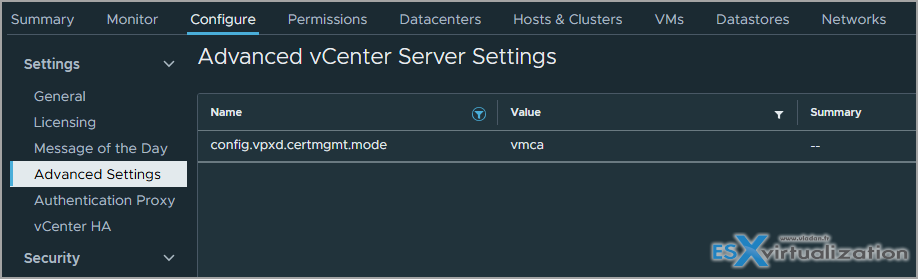
Setting the mode to vmca ensures that vCenter Server uses its built-in VMware Certificate Authority (VMCA) to manage and provision certificates for ESXi hosts. This is the default and recommended mode for ease of management, as it allows vCenter to automatically handle certificate renewal and distribution across the environment. Note that if you previously used a custom certificate mode, changing to vmca will cause vCenter to overwrite existing custom certificates on the ESXi hosts during the next certificate refresh.
Link to the VMware KB article
The End of General Support for VMware vSphere 8.0 is scheduled for October 11, 2027. Following this, Technical Guidance will continue until October 11, 2029. After these dates, vSphere 8.0 will no longer receive updates, bug fixes, or official support from VMware. It seems like a lot of time, but hey, if you plan not to follow the pricing hikes from Broadcom and planning to leave somewhere else, remember that time to transition isn't just V2V, it's also the preparation, re-thinking of new architecture, rethinking the processes etc, etc.
Final Words
VMware keeps your infrastructure safe while you can still have access to updates and patches. The last opportunity to purchase perpetual licenses for VMware vSphere 8.x was in early 2024, as VMware ceased selling perpetual licenses for its data center products effective January 15, 2024. Customers who had active Support and Subscription (SnS) contracts could still upgrade their existing perpetual licenses to vSphere 8.x during this window, but no new perpetual licenses are available for purchase. After this date, all new licensing is subscription-based only.
We're heading to the end of 2025 and in one of my next posts I'll try to recap the 2025 etc. Stay tuned -:).
More posts from ESX Virtualization:
- Veeam Backup and Replication Upgrade on Windows – Yes we can
- Securing Your Backups On-Premises: How StarWind VTL Fits Perfectly with Veeam and the 3-2-1 Rule
- Winux OS – Why I like it?
- VMware Alternative – OpenNebula: Powering Edge Clouds and GPU-Based AI Workloads with Firecracker and KVM
- Proxmox 9 (BETA 1) is out – What’s new?
- Another VMware Alternative Called Harvester – How does it compare to VMware?
- VMware vSphere 9 Standard and Enterprise Plus – Not Anymore?
- VMware vSphere Foundation (VVF 9) and VMware Cloud Foundation (VCF 9) Has been Released
- Vulnerability in your VMs – VMware Tools Update
- VMware ESXi FREE is FREE again!
- No more FREE licenses of VMware vSphere for vExperts – What’s your options?
- VMware Workstation 17.6.2 Pro does not require any license anymore (FREE)
- Two New VMware Certified Professional Certifications for VMware administrators: VCP-VVF and VCP-VCF
- Patching ESXi Without Reboot – ESXi Live Patch – Yes, since ESXi 8.0 U3
- Update ESXi Host to the latest ESXi 8.0U3b without vCenter
- Upgrade your VMware VCSA to the latest VCSA 8 U3b – latest security patches and bug fixes
- VMware vSphere 8.0 U2 Released – ESXi 8.0 U2 and VCSA 8.0 U2 How to update
- What’s the purpose of those 17 virtual hard disks within VMware vCenter Server Appliance (VCSA) 8.0?
- VMware vSphere 8 Update 2 New Upgrade Process for vCenter Server details
- What’s New in VMware Virtual Hardware v21 and vSphere 8 Update 2?
- vSphere 8.0 Page
- ESXi 7.x to 8.x upgrade scenarios
- VMware vCenter Server 7.03 U3g – Download and patch
- Upgrade VMware ESXi to 7.0 U3 via command line
- VMware vCenter Server 7.0 U3e released – another maintenance release fixing vSphere with Tanzu
- What is The Difference between VMware vSphere, ESXi and vCenter
- How to Configure VMware High Availability (HA) Cluster
Stay tuned through RSS, and social media channels (Twitter, FB, YouTube)





Leave a Reply