
If you’re like me and have spent years wrestling with traditional three-tier infrastructure in small-to-medium businesses or remote office/branch office (ROBO) setups, you know the pain. Separate servers for compute, dedicated SAN arrays for storage, complex networking layers, and the constant worry about single points of failure. Add in rising licensing costs from the big virtualization vendors and power-hungry racks that eat up your budget, and it starts to feel outdated fast. That’s exactly why I’ve been keeping a close eye on StarWind’s HyperConverged Appliance (HCA) line. It’s a true turnkey building block that converges compute, storage, networking, virtualization software, and management into one compact, pre-configured platform. No more Frankenstein setups – just plug-and-play hyperconvergence that delivers enterprise-grade features without the enterprise price tag.
StarWind HCI Appliance isn’t some generic white-box solution. It’s powered by their battle-tested StarWind Virtual SAN (VSAN) software, which virtualizes local disks across nodes into a shared storage pool. You get a minimum two-node cluster right out of the box (no witness node required), and you can scale out as your needs grow. The appliance ships with your choice of hypervisor – VMware vSphere, Microsoft Hyper-V, or even Proxmox VE—plus full integration and tuning done by StarWind engineers before it lands on your doorstep. I’ve tested similar StarWind VSAN deployments in the past, and the appliance version takes that maturity to the next level. It’s like Lego® for sysadmins: you get the blocks, the instructions, and the support to build exactly what your environment demands.
Let’s get some technical details on the storage side, because that’s where StarWind really shines. Each appliance node uses enterprise-grade hardware tailored to three distinct lines: Value Flash (1U, perfect for low-VM-count ROBO with modest IOPS), Capacity Flash (2U, balanced for higher density and storage needs in SMBs), and Performance Flash (1U or 2U, all-flash NVMe monsters for data-intensive workloads). You’re looking at Intel Xeon 6 processors (single or dual), up to 8 TB of DDR5 ECC RAM per node, and raw capacity scaling from 35 TB in the Value line up to 100 TB in the others. Networking starts with 10/25 GbE ports and scales to 100/200 GbE options with RDMA support—critical for keeping latency low.
The real magic happens under the hood with StarWind VSAN. Local NVMe SSDs (or hybrid configs where needed) are pooled and presented as shared storage over proven iSCSI or cutting-edge NVMe-oF protocols. Data is synchronously mirrored between nodes—two-way or three-way replication – over a dedicated high-speed interconnect. Write operations are acknowledged only after they hit both (or all three) nodes, giving you zero Recovery Point Objective (RPO) and zero Recovery Time Objective (RTO) for your mission-critical VMs. Thin provisioning, snapshots, and linked clones are native, and the underlying ZFS self-healing filesystem automatically detects and repairs silent corruption without any admin intervention. In my experience with StarWind VSAN, this synchronous replication setup eliminates the traditional SAN bottleneck while delivering screaming performance—often unlocking more of your hardware’s potential than proprietary solutions.
Now, let’s talk about the part that often gets overlooked until something actually breaks: support. StarWind has built a reputation over the years for being one of the most responsive vendors in the storage and virtualization space, and the HCI Appliance takes that to another level. Every appliance comes with a single support umbrella covering hardware, software, hypervisor integration, and networking. You’re never waiting for business hours when production is down. AI-powered telemetry and the built-in “call home” system proactively monitor the entire stack and alert StarWind engineers before issues escalate. In case something does go wrong—say a flaky NIC, a RAID rebuild that needs hand-holding, or an unexpected hypervisor interaction—their team jumps in with full-stack knowledge. They’ve pre-configured and fine-tuned the appliance, so troubleshooting isn’t a guessing game between vendors.
I’ve heard consistent feedback from colleagues and case studies: Bosch Security cut costs by 60%, Oxford University simplified their environment dramatically, and even the USS Midway museum saved $80K while gaining rock-solid uptime. StarWind engineers often provide free installation assistance and PoC hand-holding, which is rare in this industry. Compare that to the finger-pointing you sometimes get with multi-vendor stacks, and you start to see why the appliance approach makes sense. You’re not just buying hardware and software—you’re buying peace of mind.
Of course, no solution is perfect for every scenario. If you’re running massive enterprise workloads with thousands of VMs, you might look at larger converged options. But for SMBs, ROBO, edge locations, or VDI deployments, the StarWind HCI Appliance hits the sweet spot. It slashes power consumption and rack space, reuses existing software licenses where possible, and delivers the kind of high availability that used to require six-figure SAN investments. The web-based management console is intuitive (with CLI and PowerShell options for the power users), centralized management of multiple sites is straightforward, and the whole thing is designed for unmanned operation.
In the end, StarWind HCI Appliances prove that hyperconvergence doesn’t have to be complicated or expensive. With local-disk-based storage virtualization, synchronous replication that guarantees zero data loss, self-healing capabilities that run in the background, and support that actually supports you when the unexpected hits, it’s a compelling choice for any organization tired of legacy complexity. The math is simple: lower TCO, higher uptime, and engineers who treat your environment like their own.
StarWind offers two primary deployment models for Hyperconverged Infrastructure (HCI): the HCI Appliance (HCA), a pre-configured hardware/software turnkey solution, and the Virtual HCI Appliance (VHCA), which runs on customer-provided hardware.
Hardware and Software Options
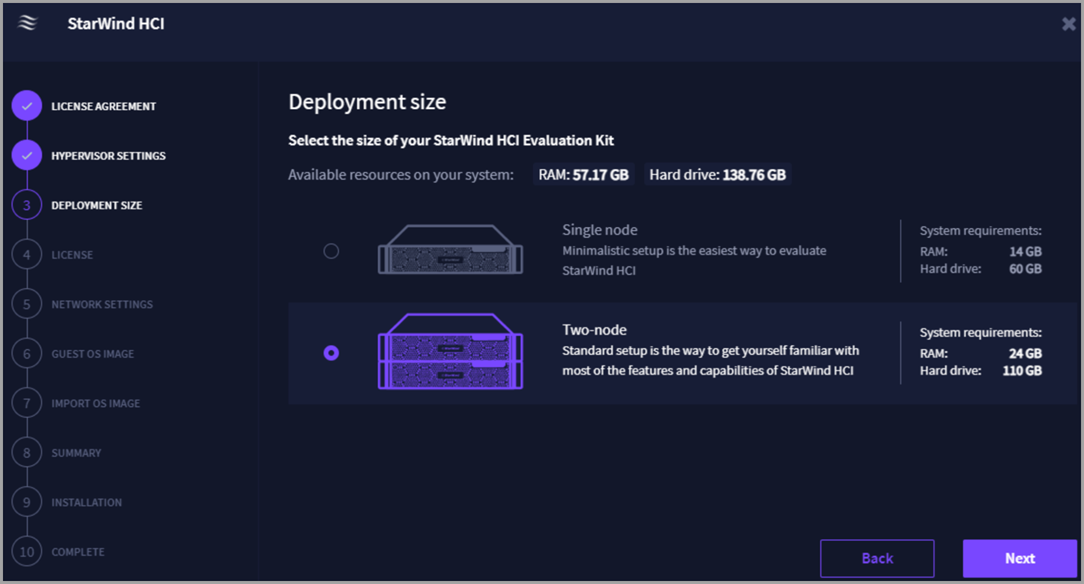
StarWind HCI Appliance (HCA) The HCA is a fully integrated, pre-configured platform combining compute, storage, networking, and virtualization in a compact, two-node footprint. It is designed for Edge, ROBO, and SMB environments, offering 24/7 ProActive Premium Support and eliminating the need for DIY integration.
- Performance Flash (P-Spec): Delivers maximum performance for data-intensive applications; available in 1U or 2U form factors with up to 100 TB raw capacity.
- Capacity Flash (C-Spec): Balances capacity and performance for higher VM density; available in 2U form factors with up to 100 TB raw capacity (up to 170 TB in specific datasheet configurations).
- Value Flash (V-Spec): Ideal for ROBO and small SMBs with modest IOPS; available in 1U form factors with up to 35 TB raw capacity.
- Specifications: Each node supports Single or Dual Intel Xeon 6 processors, up to 8 TB DDR5 ECC RAM, and 10/25/100/200 GbE networking.
- Virtualization: Supports VMware vSphere, Microsoft Hyper-V, and Proxmox VE.
StarWind Virtual HCI Appliance (VHCA) For organizations wishing to use their own hardware, StarWind offers the VHCA, a software-defined solution that transforms existing servers into a hyperconverged cluster.
- Free Version: Supports KVM (KVM-based) hypervisors only, with community support and no production use recommendation.
- Paid Version: Supports VMware vSphere, Microsoft Hyper-V, and Proxmox VE, offering Standard, Premium, or ProActive Premium support plans.
- Licensing: Licensed per node, including continuous software updates and proactive monitoring.
Key Features Across Both Options
- Architecture: True two-node high availability with synchronous mirroring, requiring no witness or extra hardware.
- Storage: Powered by StarWind Virtual SAN with an all-NVMe backend, supporting iSCSI and NVMe-oF protocols.
- Management: Intuitive web-based UI for monitoring uptime, resource usage, and performance, featuring AI-powered telemetry and “call-home” systems.
- Scalability: Clusters can be expanded by adding nodes without re-architecting the environment.
- Support: The HCA includes ProActive Premium Support from day one, while the VHCA offers optional support tiers based on the license purchased.
Final Words
If you’re evaluating HCI options for 2026 and beyond, do yourself a favor and request a quote or spin up the free Virtual HCI Appliance version on your existing hardware for a quick PoC. You’ll see the HA magic, the replication performance, and the storage efficiency firsthand. Head over to the StarWind website, download the datasheet, and give their team a shout – they’re genuinely helpful.
Virtual HCI Appliance product page
More posts about StarWind:
- StarWind V2V / P2V Converter Version 9 (build 848) – Multi-VM Conversions, Full CLI Support, Hot Migrations, and Cloud Improvements Make This Free Tool a Datacenter Must-Have
- StarWind VSAN for Hyper-V: Synchronous Replication for High-Availability Shared Storage
- StarWind VTL: Boosting Immutability and Ransomware Protection in Your Own Datacenter
- StarWind HyperConverged Appliance with Proxmox VE: Perfect HCI Solution for Small Businesses
- Fortifying Your Backup Infrastructure Against Ransomware – StarWind VTL Best Practices
- FREE version of StarWind VSAN vs Trial of Full version
- Installation of StarWind VSAN Plugin for vSphere
- StarWind VSAN with new UI and deployment options
- Backup Appliance with NVMe Speed and GRAID – StarWind Backup Appliance
- Exploring StarWind VSAN: High Availability, Cost Savings, and Performance
- StarWind V2V Converter The Cutting-Edge Upgrade: StarWind V2V Converter’s April 2024 Innovations
- What is StarWind Tape Redirector (FREE) and what’s the benefits?
- 5 Easy Steps to be more resilient with Two Hosts only – StarWind VSAN
- How StarWind VSAN solution can save you money and energy in ROBO environments
- 2-Nodes clusters without Witness – StarWind VSAN Heartbeat Failover Strategy
- You can’t extend backup window – Check NVMe Backup Appliance from StarWind
- Replacing Aging Hardware SAN Device by a Software – StarWind VSAN
- StarWind V2V Converter (PV2 Migrator) FREE utility
- Cluster with 2-Nodes only – How about quorum?
- StarWind VSAN Latest update allows faster synchronization with storing synchronization journals on separate storage
- How to Update StarWind VSAN for VMware on Linux- Follow UP
- StarWind SAN & NAS software details for VMware and Hyper-V
- VMware vSphere and HyperConverged 2-Node Scenario from StarWind – Step By Step(Opens in a new browser tab)
- How To Create NVMe-Of Target With StarWind VSAN
- Veeam 3-2-1 Backup Rule Now With Starwind VTL
- StarWind and Highly Available NFS
- StarWind VSAN on 3 ESXi Nodes detailed setup
- VMware VSAN Ready Nodes in StarWind HyperConverged Appliance
More posts from ESX Virtualization:
- Veeam Backup and Replication Upgrade on Windows – Yes we can
- Securing Your Backups On-Premises: How StarWind VTL Fits Perfectly with Veeam and the 3-2-1 Rule
- Winux OS – Why I like it?
- VMware Alternative – OpenNebula: Powering Edge Clouds and GPU-Based AI Workloads with Firecracker and KVM
- Proxmox 9 (BETA 1) is out – What’s new?
- Another VMware Alternative Called Harvester – How does it compare to VMware?
- VMware vSphere 9 Standard and Enterprise Plus – Not Anymore?
- VMware vSphere Foundation (VVF 9) and VMware Cloud Foundation (VCF 9) Has been Released
- Vulnerability in your VMs – VMware Tools Update
- VMware ESXi FREE is FREE again!
- No more FREE licenses of VMware vSphere for vExperts – What’s your options?
- VMware Workstation 17.6.2 Pro does not require any license anymore (FREE)
- Two New VMware Certified Professional Certifications for VMware administrators: VCP-VVF and VCP-VCF
- Patching ESXi Without Reboot – ESXi Live Patch – Yes, since ESXi 8.0 U3
- Update ESXi Host to the latest ESXi 8.0U3b without vCenter
- Upgrade your VMware VCSA to the latest VCSA 8 U3b – latest security patches and bug fixes
- VMware vSphere 8.0 U2 Released – ESXi 8.0 U2 and VCSA 8.0 U2 How to update
- What’s the purpose of those 17 virtual hard disks within VMware vCenter Server Appliance (VCSA) 8.0?
- VMware vSphere 8 Update 2 New Upgrade Process for vCenter Server details
- What’s New in VMware Virtual Hardware v21 and vSphere 8 Update 2?
- vSphere 8.0 Page
- ESXi 7.x to 8.x upgrade scenarios
- VMware vCenter Server 7.03 U3g – Download and patch
- Upgrade VMware ESXi to 7.0 U3 via command line
- VMware vCenter Server 7.0 U3e released – another maintenance release fixing vSphere with Tanzu
- What is The Difference between VMware vSphere, ESXi and vCenter
- How to Configure VMware High Availability (HA) Cluster
Stay tuned through RSS, and social media channels (Twitter, FB, YouTube)





Leave a Reply