
I have been blogging about virtualization, storage, and backup solutions since the late 2000s, I've seen backup strategies evolve dramatically. Physical tape libraries were once the gold standard for long-term retention and air-gapping, but they come with real pain points: high hardware and media costs, slow restore times, mechanical failures, and the logistical hassle of offsite vaulting.
Enter StarWind Virtual Tape Library (VTL) — a software solution that emulates physical tape libraries using commodity disk storage (and optional cloud tiering). It delivers the ransomware protection and immutability benefits of tape without owning a single LTO drive or robot. In this technical deep dive, I'll explain why StarWind VTL fits perfectly into modern ransomware-resilient architectures, especially when paired with tools like Veeam Backup & Replication and the classic 3-2-1 rule.
Why Tape (or Its Virtual Equivalent) Still Matters in the Ransomware Era
Ransomware operators have shifted focus. They don't just encrypt production data anymore — they hunt for backups. Mutable disk-based repositories are prime targets because once compromised, attackers can delete or encrypt recovery points, leaving you with no clean restore.Traditional physical tape provides a strong air gap: data is written sequentially, often removed from the library, and stored offline. But maintaining tape infrastructure is expensive and slow for restores. StarWind VTL bridges this gap by presenting virtual tape drives, libraries, and cartridges over iSCSI (or similar) to your backup application. Your backup software sees a standard tape library (supporting IBM or HP LTO emulation), but the backend is fast, reliable disk storage with WORM (Write-Once-Read-Many) capabilities.
Key technical advantage: Once a virtual tape is written and closed, it becomes immutable. Even administrative or root-level access on the VTL host cannot modify or delete the data until the retention policy allows. This logical air-gapping starves ransomware of writable targets.
StarWind VTL Architecture and Deployment Options
StarWind VTL can be deployed in several ways for flexibility and security:
- Linux-based ISO (recommended for production): Bootable appliance image for bare-metal or VM deployment. Lightweight footprint with a clean web UI for management.
- Windows application: Easier for some environments already Windows-centric.
- Pre-built Appliance: Hardware + software bundle from StarWind for turnkey deployments with proactive monitoring.
You connect the VTL via iSCSI to your backup server. It emulates multiple virtual tape drives (typically 4–10+ depending on licensing) and supports thousands of virtual cartridges with capacities from hundreds of GB to tens of TB each. Under the hood, you create storage pools from local HDDs (for capacity), SSDs/RAID (for performance), or hybrid setups.
Best practice for ransomware resilience (drawn from real-world setups and StarWind recommendations):
- Deploy the VTL on dedicated, isolated hardware or storage — not sharing production datastores or networks.
- Do not join the VTL server to the domain. Use local accounts or dedicated service accounts with minimal privileges.
- Enable CHAP authentication for iSCSI initiators.
- Disable unnecessary file shares and keep the firewall tight with only required ports open.
- Use software or hardware RAID (5/6/10/60) on the backend for redundancy. For faster restores, prioritize flash or hybrid pools.
In my experience with similar setups over the years, isolating the VTL this way adds a significant security layer. Even if your backup server or production environment is breached, the VTL remains a separate fortress.
Integration with Veeam and the 3-2-1 Backup Rule
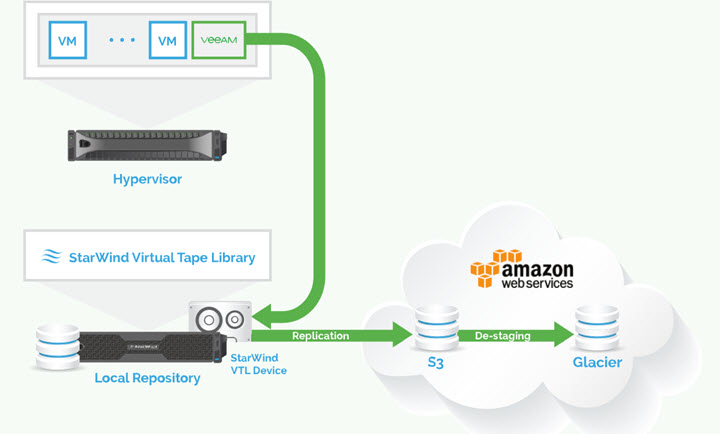
One of the strongest use cases is with Veeam Backup & Replication. Veeam has excellent native tape support, but StarWind VTL makes it faster and more cost-effective by replacing physical hardware.
You add the StarWind VTL as a tape server in Veeam. Backup jobs can target virtual tapes directly, and you benefit from features like:
- Fast disk-based writes (no mechanical delays).
- Immutable tapes for the “air gap.”
- Optional automatic tiering/replication of closed virtual tapes to cloud object storage (AWS S3, Glacier, Backblaze B2, etc.) for true offsite copies.
This maps beautifully to the 3-2-1 rule:
- 3 copies of data.
- 2 different media types (e.g., disk repository + virtual tape).
- 1 offsite (cloud tier or replicated copy).
Production VMs → Primary Veeam repository (disk) → StarWind VTL (immutable virtual tape on-prem) → Cloud offload (offsite). You get fast local restores from VTL while maintaining compliance and disaster recovery options. No more waiting for physical tapes to be recalled from a vault.
Performance note: In properly configured environments with 10GbE+ networking and dedicated VLANs, you can achieve high throughput without bottlenecks. Restores are seek-free compared to real tape, often cutting RTO dramatically.
Additional Features and Ransomware-Proofing Capabilities
Beyond basic emulation, StarWind VTL includes:
- WORM/Immutability: Core to its ransomware defense. Tapes are locked post-write.
- Cloud Tiering: Automate movement of aged tapes to inexpensive cloud storage while keeping indexes local for quick discovery.
- Replication: Create additional copies across sites or to cloud for multi-region resilience.
- LTFS Support: For easier file-level access and drag-and-drop restores in some scenarios.
- Scalability: From small ROBO deployments (free version available with limitations) to enterprise-scale.
There is a free edition of StarWind VTL limited to a small number of virtual tapes and PowerShell configuration (no full GUI in some versions), perfect for labs, testing, or smaller environments.
For production, the paid version unlocks unlimited scalability, full management tools, priority support, and advanced features like AI-powered telemetry in appliances.
Real-World Considerations and Best Practices
From deployments I've reviewed and similar solutions tested:
- Size your backend storage generously — account for deduplication/compression ratios in your backup software.
- Monitor iSCSI performance closely; dedicated 10/25/40GbE links are ideal for larger jobs.
- Test restores regularly — this is where virtual tape shines over physical.
- Combine with other layers: Use StarWind VSAN or similar for HA on the storage side if needed, and follow least-privilege principles everywhere.
- Compliance: WORM capabilities help with regulations requiring long-term immutable retention (GDPR, HIPAA, etc.).
Potential drawbacks? Like any software-defined solution, it requires proper underlying hardware and networking. Poor configuration can introduce single points of failure, so follow best practices religiously.
Final Words
StarWind VTL is one of those “software replaces hardware” solutions that genuinely simplifies infrastructure while strengthening security. It lets you retire aging physical tape libraries, accelerate backups and restores, slash costs, and — most importantly — create a ransomware-proof tier that fits seamlessly into existing tape-centric workflows and the 3-2-1 rule.In an era where cloud egress fees, internet dependency, and shared responsibility models add complexity, keeping a fast, immutable, on-premises air-gapped copy makes perfect sense. Whether you're an SMB ditching tapes entirely or an enterprise adding defense-in-depth, StarWind VTL deserves a serious look.
If you're running Veeam or any tape-aware backup software and worried about ransomware, I highly recommend testing the free version in a lab. The deployment is straightforward, and the peace of mind is invaluable.Have you implemented virtual tape yet? What challenges are you facing with your current backup strategy? Feel free to share in the comments.
More posts about StarWind:
- StarWind V2V / P2V Converter Version 9 (build 848) – Multi-VM Conversions, Full CLI Support, Hot Migrations, and Cloud Improvements Make This Free Tool a Datacenter Must-Have
- StarWind VSAN for Hyper-V: Synchronous Replication for High-Availability Shared Storage
- StarWind VTL: Boosting Immutability and Ransomware Protection in Your Own Datacenter
- StarWind HyperConverged Appliance with Proxmox VE: Perfect HCI Solution for Small Businesses
- Fortifying Your Backup Infrastructure Against Ransomware – StarWind VTL Best Practices
- FREE version of StarWind VSAN vs Trial of Full version
- Installation of StarWind VSAN Plugin for vSphere
- StarWind VSAN with new UI and deployment options
- Backup Appliance with NVMe Speed and GRAID – StarWind Backup Appliance
- Exploring StarWind VSAN: High Availability, Cost Savings, and Performance
- StarWind V2V Converter The Cutting-Edge Upgrade: StarWind V2V Converter’s April 2024 Innovations
- What is StarWind Tape Redirector (FREE) and what’s the benefits?
- 5 Easy Steps to be more resilient with Two Hosts only – StarWind VSAN
- How StarWind VSAN solution can save you money and energy in ROBO environments
- 2-Nodes clusters without Witness – StarWind VSAN Heartbeat Failover Strategy
- You can’t extend backup window – Check NVMe Backup Appliance from StarWind
- Replacing Aging Hardware SAN Device by a Software – StarWind VSAN
- StarWind V2V Converter (PV2 Migrator) FREE utility
- Cluster with 2-Nodes only – How about quorum?
- StarWind VSAN Latest update allows faster synchronization with storing synchronization journals on separate storage
- How to Update StarWind VSAN for VMware on Linux- Follow UP
- StarWind SAN & NAS software details for VMware and Hyper-V
- VMware vSphere and HyperConverged 2-Node Scenario from StarWind – Step By Step(Opens in a new browser tab)
- How To Create NVMe-Of Target With StarWind VSAN
- Veeam 3-2-1 Backup Rule Now With Starwind VTL
- StarWind and Highly Available NFS
- StarWind VSAN on 3 ESXi Nodes detailed setup
- VMware VSAN Ready Nodes in StarWind HyperConverged Appliance
More posts from ESX Virtualization:
- Veeam Backup and Replication Upgrade on Windows – Yes we can
- Securing Your Backups On-Premises: How StarWind VTL Fits Perfectly with Veeam and the 3-2-1 Rule
- Winux OS – Why I like it?
- VMware Alternative – OpenNebula: Powering Edge Clouds and GPU-Based AI Workloads with Firecracker and KVM
- Another VMware Alternative Called Harvester – How does it compare to VMware?
- VMware vSphere 9 Standard and Enterprise Plus – Not Anymore?
- VMware vSphere Foundation (VVF 9) and VMware Cloud Foundation (VCF 9) Has been Released
- Vulnerability in your VMs – VMware Tools Update
- VMware ESXi FREE is FREE again!
- No more FREE licenses of VMware vSphere for vExperts – What’s your options?
- VMware Workstation 17.6.2 Pro does not require any license anymore (FREE)
- Two New VMware Certified Professional Certifications for VMware administrators: VCP-VVF and VCP-VCF
- Patching ESXi Without Reboot – ESXi Live Patch – Yes, since ESXi 8.0 U3
- Update ESXi Host to the latest ESXi 8.0U3b without vCenter
- Upgrade your VMware VCSA to the latest VCSA 8 U3b – latest security patches and bug fixes
- VMware vSphere 8.0 U2 Released – ESXi 8.0 U2 and VCSA 8.0 U2 How to update
- What’s the purpose of those 17 virtual hard disks within VMware vCenter Server Appliance (VCSA) 8.0?
- VMware vSphere 8 Update 2 New Upgrade Process for vCenter Server details
- What’s New in VMware Virtual Hardware v21 and vSphere 8 Update 2?
- vSphere 8.0 Page
- ESXi 7.x to 8.x upgrade scenarios
- VMware vCenter Server 7.03 U3g – Download and patch
- Upgrade VMware ESXi to 7.0 U3 via command line
- VMware vCenter Server 7.0 U3e released – another maintenance release fixing vSphere with Tanzu
- What is The Difference between VMware vSphere, ESXi and vCenter
- How to Configure VMware High Availability (HA) Cluster
Stay tuned through RSS, and social media channels (Twitter, FB, YouTube)





Leave a Reply