
Over the years on this blog (going back to the ESX 3.x days), I've always been on the lookout for solutions that deliver real value without breaking the bank. Virtualization has always been about efficiency, consolidation, and squeezing every last drop of performance and availability out of your hardware. StarWind Virtual SAN (VSAN) fits perfectly into that philosophy. It's a software-defined storage solution that turns your existing server internal disks (HDDs, SSDs, NVMe) into highly available shared storage by synchronously mirroring data between nodes.
No need for expensive external SAN arrays anymore. I've covered StarWind multiple times here since around 2015, from 2-node setups on VMware vSphere and Hyper-V, to ROBO deployments, 3-node clusters, and even integrations with Proxmox or Linux KVM. What keeps bringing me back is how practical it is for real-world environments – especially small to medium businesses, remote offices, or anyone tired of overpaying for traditional storage.
How StarWind VSAN Works
At its core, StarWind VSAN is hypervisor-centric. You install it on your hosts (or as a Controller VM / CVM), and it aggregates local storage, applies caching, deduplication, and mirrors it synchronously across nodes. This creates a fault-tolerant pool that your VMs see as regular shared storage (via iSCSI, NFS, SMB, or even NVMe-oF). If one node fails, the other(s) continue serving I/O seamlessly – zero RPO for your critical workloads in many cases. It supports 2-way or 3-way replication, multi-tiered caching (RAM L1 + Flash L2), inline/offline deduplication, compression, and log-structured approaches for excellent performance.
This makes it ideal for:
- ROBO environments: Limited staff, tight budgets, but need HA.
- Hyperconverged setups: Compute + storage on the same boxes.
- Replacing aging hardware SANs: Reuse what you have.
- vSphere, Hyper-V, KVM/Proxmox, and more.
Performance is often surprisingly good thanks to the caching and efficient I/O path. Many users report it outperforming expectations in mixed workloads.The Free Version – Production-Ready and Cost-Saving GoldOne of the things that sets StarWind apart is their lifetime FREE version. This isn't a crippled 30-day trial or a “home lab only” gimmick.
It's a full-fledged production storage platform with no capacity limits, perpetual license, and unlimited served capacity/initiator hosts. You can genuinely run it in production and save a ton on hardware and licensing.For many ROBO or SMB deployments I've consulted on, this free tier has been a game-changer. You avoid thousands in SAN hardware costs and licensing, reuse existing servers, and still get rock-solid availability. Power consumption and rack space drop too – big win for smaller sites.
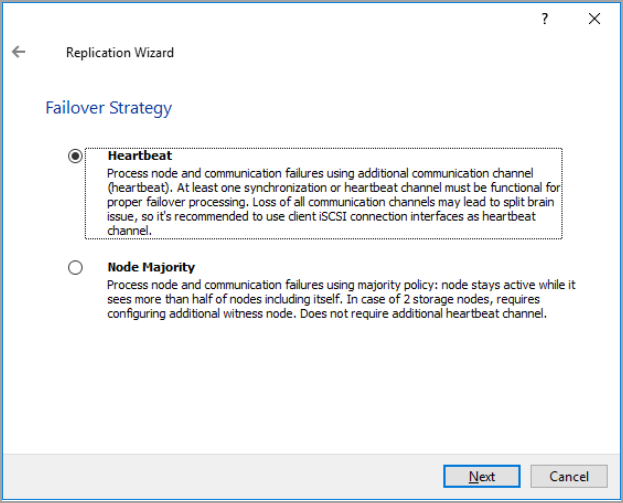
StarWind can replicate via 2 different strategies:
Hearbeat or Node Majority
Free vs Paid: The Real Differences
While the free version covers a lot of ground, the paid version unlocks more polish, scale, and convenience.
Here's a clear comparison:
Management & Usability:
- Free: Primarily PowerShell CLI and Text UI. For Linux/KVM it's quite capable, but Windows version has restrictions. No full GUI out of the box.
- Paid: Full Web UI (modern, responsive, works from any device), Windows GUI, vCenter Plug-In for ESXi. Much easier for day-to-day monitoring, provisioning, and management.
Scale & Nodes:
- Free: Limited to 3 VSAN nodes.
- Paid: Unlimited nodes (great for larger clusters).
Advanced Features:
- Paid adds things like full ZFS support in CVM, broader NVMe-oF, asynchronous replication (for DR), VTL (Virtual Tape Library), and more hypervisor-specific integrations.
- Both have synchronous HA replication, caching, iSCSI/SMB/NFS, but paid removes limitations and adds enterprise options.
Support:
- Free: Community forums only – self-supported.
- Paid: Standard, Premium, or ProActive Premium (with 24/7, fast SLAs, proactive support). This is huge for production where you need phone/email/Zoom help and peace of mind.
In short, the free version gives you the core engine for free (and it's solid). Paid is for when you want zero friction, larger scale, advanced DR, easier management, and professional support. Many start with free (or trial) and upgrade later.
Real-World Cost Savings
This is where it gets exciting. By using the free version in production for a 2- or 3-node cluster:
- No external SAN hardware (saves $10k–$50k+ easily).
- No per-core or capacity-based licensing nightmares.
- Reuse existing servers and disks.
- Lower power, cooling, and space requirements.
For ROBO or branch offices, this is massive. I've seen deployments where StarWind on two decent servers replaced a full SAN + licenses, cutting costs dramatically while improving performance via local caching. Even if you go paid, the perpetual per-node licensing is straightforward and affordable compared to alternatives.My Recommendations & Setup TipsFor most readers here running vSphere or Hyper-V:
- Start with the free version or a full trial to test in your environment.
- Use a dedicated storage network (10GbE+ recommended, RDMA if possible).
- For VMware, consider the CVM deployment – it's the preferred modern path.
- Leverage caching aggressively: Put your hottest data on SSDs/NVMe.
- Test failover thoroughly – it works very well.
Watch out: Don't confuse the lifetime free with the 30-day trial – they are different downloads, and the trial has all paid features temporarily.
Final Words
StarWind VSAN proves you don't need to spend a fortune on storage to get enterprise-grade HA and performance. The free version being production-viable is rare and genuinely useful – it can save significant costs for many organizations while delivering reliable shared storage. If your needs grow (more nodes, easier management, official support), upgrading to paid is seamless.Whether you're virtualizing a small office, building a ROBO cluster, or modernizing an existing setup, give it a try.
More posts about StarWind:
- StarWind V2V / P2V Converter Version 9 (build 848) – Multi-VM Conversions, Full CLI Support, Hot Migrations, and Cloud Improvements Make This Free Tool a Datacenter Must-Have
- StarWind VSAN for Hyper-V: Synchronous Replication for High-Availability Shared Storage
- StarWind VTL: Boosting Immutability and Ransomware Protection in Your Own Datacenter
- StarWind HyperConverged Appliance with Proxmox VE: Perfect HCI Solution for Small Businesses
- Fortifying Your Backup Infrastructure Against Ransomware – StarWind VTL Best Practices
- FREE version of StarWind VSAN vs Trial of Full version
- Installation of StarWind VSAN Plugin for vSphere
- StarWind VSAN with new UI and deployment options
- Backup Appliance with NVMe Speed and GRAID – StarWind Backup Appliance
- Exploring StarWind VSAN: High Availability, Cost Savings, and Performance
- StarWind V2V Converter The Cutting-Edge Upgrade: StarWind V2V Converter’s April 2024 Innovations
- What is StarWind Tape Redirector (FREE) and what’s the benefits?
- 5 Easy Steps to be more resilient with Two Hosts only – StarWind VSAN
- How StarWind VSAN solution can save you money and energy in ROBO environments
- 2-Nodes clusters without Witness – StarWind VSAN Heartbeat Failover Strategy
- You can’t extend backup window – Check NVMe Backup Appliance from StarWind
- Replacing Aging Hardware SAN Device by a Software – StarWind VSAN
- StarWind V2V Converter (PV2 Migrator) FREE utility
- Cluster with 2-Nodes only – How about quorum?
- StarWind VSAN Latest update allows faster synchronization with storing synchronization journals on separate storage
- How to Update StarWind VSAN for VMware on Linux- Follow UP
- StarWind SAN & NAS software details for VMware and Hyper-V
- VMware vSphere and HyperConverged 2-Node Scenario from StarWind – Step By Step(Opens in a new browser tab)
- How To Create NVMe-Of Target With StarWind VSAN
- Veeam 3-2-1 Backup Rule Now With Starwind VTL
- StarWind and Highly Available NFS
- StarWind VSAN on 3 ESXi Nodes detailed setup
- VMware VSAN Ready Nodes in StarWind HyperConverged Appliance
More posts from ESX Virtualization:
- Veeam Backup and Replication Upgrade on Windows – Yes we can
- Securing Your Backups On-Premises: How StarWind VTL Fits Perfectly with Veeam and the 3-2-1 Rule
- Winux OS – Why I like it?
- VMware Alternative – OpenNebula: Powering Edge Clouds and GPU-Based AI Workloads with Firecracker and KVM
- Another VMware Alternative Called Harvester – How does it compare to VMware?
- VMware vSphere 9 Standard and Enterprise Plus – Not Anymore?
- VMware vSphere Foundation (VVF 9) and VMware Cloud Foundation (VCF 9) Has been Released
- Vulnerability in your VMs – VMware Tools Update
- VMware ESXi FREE is FREE again!
- No more FREE licenses of VMware vSphere for vExperts – What’s your options?
- VMware Workstation 17.6.2 Pro does not require any license anymore (FREE)
- Two New VMware Certified Professional Certifications for VMware administrators: VCP-VVF and VCP-VCF
- Patching ESXi Without Reboot – ESXi Live Patch – Yes, since ESXi 8.0 U3
- Update ESXi Host to the latest ESXi 8.0U3b without vCenter
- Upgrade your VMware VCSA to the latest VCSA 8 U3b – latest security patches and bug fixes
- VMware vSphere 8.0 U2 Released – ESXi 8.0 U2 and VCSA 8.0 U2 How to update
- What’s the purpose of those 17 virtual hard disks within VMware vCenter Server Appliance (VCSA) 8.0?
- VMware vSphere 8 Update 2 New Upgrade Process for vCenter Server details
- What’s New in VMware Virtual Hardware v21 and vSphere 8 Update 2?
- vSphere 8.0 Page
- ESXi 7.x to 8.x upgrade scenarios
- VMware vCenter Server 7.03 U3g – Download and patch
- Upgrade VMware ESXi to 7.0 U3 via command line
- VMware vCenter Server 7.0 U3e released – another maintenance release fixing vSphere with Tanzu
- What is The Difference between VMware vSphere, ESXi and vCenter
- How to Configure VMware High Availability (HA) Cluster
Stay tuned through RSS, and social media channels (Twitter, FB, YouTube)





Leave a Reply